Augest 28 2023
Second Beta of Topo Maps 2
A second beta test version of Topo Maps 2 is now available.
If you had installed the first beta version, TestFlight may have automatically installed the new version for you or you can update from the TestFlight app. click here for more information.
July 28 2023
Try a Prototype of the Next Topo Maps App
I'm excited to announce that a long-awaited successor to the current Topo Maps app is on its way!
The original Topo Maps app was published way back in 2009 and it's amazing that many people have been using it continuously since then. This original app will not be going away for a while yet - but I have a new app in development which I'd like you to try out.
The new app, which is provisionally called simply "Topo Maps 2", shares maps with the existing app. So if you have the original app installed on your device with maps downloaded, you can install the new app and see the same maps immediately. New features include recording and viewing GPX tracks and a 3D mode.
If you have the existing Topo Maps (or Topo Maps for iPad) app installed on your device you can try the new app now, free of charge; click here for more information.
April 19 2023
Topo Map and Topo Maps for iPad version 1.19 released
Apple have now approved the latest update to the apps, which resolve a few issues introduced in the recent updates. Specifically, crashes while installing some maps should be fixed, the file format selection control should work again, and the app should work a bit better in Dark Mode.
Please let me know if you find any problems with this update.
April 14 2023
Forthcoming Fixes
I'm aware of three relatively minor issues with Topo Maps that I plan to resolve with the next update:
- Some maps cause the app to crash when attempting to download them.
- In the waypoint export screen, the GPX/KML/CSV selection control does not work.
- Some parts of the user interface are not legible in Dark Mode. (Specifically, the Co-ordinates box in the Add Waypoint screen, and the Search box; anywhere else?)
Do let me know soon if you find any other such issues!
April 14 2023
New Map App for New Zealand
Today I've launched a new map app using topographic maps and satellite imagery from Land Information New Zealand. Any Topo Maps users who are traveling to New Zealand should definitely check it out! App Website
March 11th 2023
Topo Maps for iPad version 1.18 released
Apple have today approved Topo Maps for iPad version 1.18. This update should resolve the same issues as the recent updates for the iPhone app, related to crashes with iOS 16.
Please get in touch if you find any problems with this update.
March 5th 2023
Topo Maps version 1.18 released
Apple have today approved Topo Maps version 1.18. This is a minor update to resolve bugs introduced with in the previous version. In particular, it restores the search scope buttons.
Please get in touch if you find any problems with this update.
October 4th 2022
iOS 16 issues anyone? (Updated)
I've been contacted by three users since iOS 16 was released who report problems with Topo Maps.
Two users report that the app fails to start, and the third reports that it crashes when they attempt to add a waypoint. I've not been able to reproduce either bug myself.
If you are seeing any issues with the app since the iOS 16 update, please get in touch. The more reports I have the more chance there is that I will track down what is going wrong.
Also, it would be very helpful if as many users as possible could turn on the settings switch that asks Apple to send me reports when the app crashes. You can find this in the main Settings app, under "Privacy and Security" then "Analytics and Improvements"; turn on "Share With Developers".
Sorry for the inconvenience.
Updated March 2023: I believe these issues were resolved in Topo Maps version 1.17.
October 13th 2021
Server Maintenance (Updated)
I will be carrying out maintenance work on the servers that provide map downloads and this website over the next few days. If all goes according to plan, backup systems will ensure that downtimes are brief. But things don't always go according to plan: please excuse any problems, and sorry for the inconvenience.
Updated October 14:The work is now complete; please let me know if you encounter any problems with map downloads or this website.
November 23rd 2020
Topo Maps on the new ARM Macs
Apple recently launched new Macs that use an ARM processor, rather than the Intel processors in the previous models. Because this is the same kind of processor as the iPhone and iPad, it means that Topo Maps can run on these Macs! Here's a screenshot of Topo Maps for iPad running on my new ARM Mac mini:
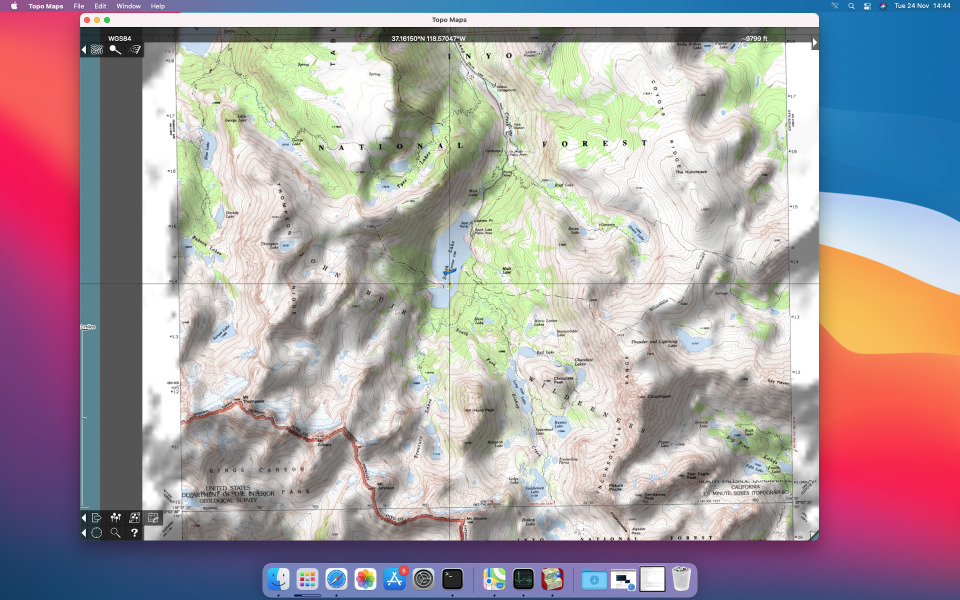
If you've already bought Topo Maps for iPad, then you can now download it for free on your new ARM-powered Mac. In the Mac App Store app, search for "Topo Maps" and choose "iPad & iPhone Apps" in the search results screen.
I'm sure there will be a few compatibility issues, and if necessary I will address those in an update in due course. Please let me know if you find any problems. One thing that I've noticed is that it's impossible to zoom out if you only have a conventional mouse on a Mac mini, as I do, so you can't do the pinch-to-zoom gesture. This shouldn't be a problem if you have a Macbook or an Apple trackpad or mouse.
The iPhone version of Topo Maps may also work; I've not yet tried it.
June 21st 2020
Server Maintenance
I will be carrying out maintenance work on the servers that provide map downloads and this website over the next few days. If all goes according to plan, backup systems will ensure that downtimes are brief. But things don't always go according to plan: please excuse any problems, and sorry for the inconvenience.
February 1st 2019
New Page about iCloud Backup
I've written a new page about how to check that iCloud Backup is enabled for Topo Maps, and describing its limitations. Read more.
October 13th 2018
Compatibility with iPhone Xs Max
I've had a couple of reports of problems with the new iPhone Xs Max; the app is reported to crash on startup.
I don't yet have one of these devices and I'm not sure what the cause is. I'm also not yet sure if it affects all users or just some, or whether it affects just the Xs Max or all of the new devices (Xs and Xr). So if you own any of the new devices - Xs, Xs Max or Xr - could you please get in touch and let me know if the app works for you.
It's also possible that the issue is related to iOS 12, rather than the new hardware; if you see problems after upgrading an older device to iOS 12, please let me know.
The "Start in Safe Mode" switch may help, though I'm not optimistic; please try it anyway and let me know what happens.
As with previous new devices I'm confident I'll be able to fix this eventually, but it may take a while. Sorry for the inconvenience.
September 2nd 2018
Topo Maps now has a Privacy Policy
Apple recently announced that they now require all apps to have a privacy policy, so I've written one for Topo Maps. This wasn't difficult: we never have any personally-identifying information about our users, unless you email us, in which case we know your email address. That's unless you consider an IP address to be personally-identifying; it could identify you to "government agencies" (and probably Facebook), but not to me.
If you want to read it, the privacy policy is here.
April 16th 2018
Topo Maps is now sold by Mappendix Limited
Until now, Topo Maps has been listed in the app store as sold by "Philip Endecott". I have now established a company to operate through and the app store listing will now show the seller as "Mappendix Limited". Rest assured that this change will make little practical difference; it is still the same person doing the work.
April 4th 2018
More Maps on New Servers
The new server infrastructure described below has been working reliably for a few weeks now, so I've decided to move many of the USGS maps over. About half of the approximately 70,000 available maps are now served from the new system.
Do please let me know if you encounter any slow or failed downloads.
March 17th 2018
More Experimental Servers: AK, MT, UT, WA
Further to my message about maps for Arizona below, after a week of reliable operation I've extended the experimental new server to include Alaska, Montana, Utah and Washington. Do please get in touch if you notice anything at all different about downloads for these states. More states will follow if it proves reliable.
March 10th 2018
Experimental Server for Arizona
I'm currently investigating ways of improving the map servers that provide map downloads for Topo Maps. As an experiment I have just moved the maps for Arizona to a new system. If it works well I'll possibly use it for more of the maps.
If you notice anything different - good or bad - about AZ downloads, please let me know.
January 26th 2018
Server downtime
The server that provides map downloads and this website was down for a while earlier today. It should be functioning normally now; if you can read this but still can't download maps, please get in touch.
It seems that the new server, which has been in use since July as described below, requires several hours to restart as it performs an enormously slow save-and-restore process each time. Discovering this was a nasty surprise, and I'm investigating how to avoid it happening in the future.
I enabled a backup system to provide map downloads, though it will have taken a while for users to benefit from this due to internet caching issues. The main server was back online after around 6 hours.
Sorry for the inconvenience.
November 18th 2017
Server Downtime
Map downloads were unavailable for about 8 hours early today due to a server problem. The underlying cause was a full disk. This should now be resolved; please get in touch if you see any further issues.
Sorry for the inconvenience.
July 27th 2017
Server Upgrade
I am in the process of upgrading the servers that support the Topo Maps app.
The first step has been to move this website to the new system, and that has now been completed.
During the next few days I will be moving services that support map downloads. I hope to be able to do this with minimal downtime. If you find that map downloads are not working, please wait for about 30 minutes and then try again. If you experience problems that last for longer than that, do please get in touch.
Sorry for any inconvenience.
May 18th 2017
Topo Maps for iPad version 1.16 approved by Apple
Apple have now approved version 1.16 of Topo Maps for iPad.
This update is to ensure compatibility with iOS 11, which is likely to be released later this year. There are no new features. The iPhone version of the app does not need to be updated.
Please let me know if you find any problems with the new version.
April 22nd 2017
64-bit Update for iPad
I've received several emails recently asking about a message from Apple saying that Topo Maps for iPad "needs to be updated" or "may slow down your iPad".
There will be an update in due course to avoid these messages. It will not make the app any faster, however. Even so I suggest being cautious about applying iOS updates until you've verified which apps will or will not be broken by them.
The iPhone version of the app is not affected by this issue.
November 6th 2015
Topo Maps version 1.16 (for iPhone) approved by Apple
Apple have now approved version 1.16 of Topo Maps, which includes some small changes to resolve the iPhone 6S and iOS 9.0 compatibility issues described below.
Note that these issues seem to have been resolved by Apple in their iOS 9.1 update, probably making this update unnecessary. I suggest not updating to this version unless you're still suffering from problems when selecting maps to install or view.
There is not yet a corresponding update for Topo Maps for iPad; that will follow, if necessary, after the iPad Pro is released.
Please let me know if you find any problems with the new version.
September 28th 2015
iPhone 6S Compatibility Issues (updated)
I've received a number of reports about compatibility issues with the new iPhone 6S. I don't yet have one of these phones, but based on what people have said it seems that the "3D touch" feature in the new phone, which measures the pressure of your fingers on the touch screen, interferes with the app's ability to detect the "long touch" needed to select a map to view or install.
I will update the app to fix this, but in the meantime some work-arounds are available:
- DON'T delete and re-install the app. This will not fix the problems and will cause you to lose your previously-downloaded maps.
- You should be able to view previously-downloaded maps via the search screen. Search for the name of the map that you want to view, or a feature on the map, and touch the search result.
- The blue arrow buttons should also continue to work for selecting adjacent previously-downloaded maps.
- You can also use the search screen to install new maps. Search for the name of the map, as shown on the index screen, and select the search result with the map icon (often you will find several search results with the same name, e.g. one for a city/mountain/lake etc. and one for the map that is named after that feature). After selecting the search result with the map icon, the index map will show that map highlighted and offer to download it.
- You can also place waypoints on maps that you use frequently, and use the waypoints screen to jump quickly to those maps.
Changing coordinate formats, distance units, etc. by doing a "long touch" on those displays will also not work; I'm not aware of a work-around for that at this time.
Update: It has been suggested that going to the main Settings app and turning off "3D Touch" under General - Accessibility will also fix the issue. If this works for you, please let me know.
Update 2: It is possible that Apple's iOS version 9.1 has fixed this. Again, if this has resolved the problem for you please let me know.
Sorry for the inconvenience. Please get in touch if you have any questions.
June 20th 2015
Server Downtime
Map downloads have been unavailable for a few hours today due to a server problem - a disk was full. This should now be resolved.
Sorry for the inconvenience.
December 3rd 2014
Server Problems
On December 2nd, a server which is involved in map downloads suffered a hardware fault. This resulted in map downloads not working for approximately 23 hours. I have now replaced the faulty component and downloads should be working again; please let me know if you continue to see any issues.
Please accept my apologies for the inconvenience caused.
November 3rd 2014
Topo Maps version 1.15 released
Apple have now approved this update, which is intended to fix the two bugs described below. Please let me know if you find any other issues with iOS 8 and iOS 8.1, or with the new iPhones and iPads.
October 19th 2014
More iOS 8 bugs! (Updated)
Users have contacted me to report a couple more bugs, which I believe to be related to iOS 8:
- The "View this location with:" feature, which allows you to open other apps or websites to view the same area, doesn't work if the device is oriented in landscape mode. If you touch this button while the device is in landscape mode, the screen will darken but the panel showing the available apps will not be visible, because it will have been positioned off the screen. At this point, to make the app functional again you'll need to quit it, then double-click the home button, and terminate the app by swiping it upwards off the screen. The feature should work normally if you always rotate the device to portrait orientation before using it.
- One user reports that the "Installing Map:" screen, which appears with a progress bar to show the progress of map downloading, does not appear after he has selected a map to install. It seems that the map does actually download - or possibly only the first map, if several were selected - but the screen with the progress bar never appears. I've not yet been able to reproduce this myself, so I would very much appreciate it if anyone else who sees this could please get in touch.
I'm sorry about these problems. There will be an update at some point soon to resolve them. In the meantime, please do contact me if you need any advice or have any other comments.
Update: I believe I've identified the cause of both of these problems, and a fix will be ready soon. I hope that this will be the last update required to resolve iOS 8 issues; if you've seen any other problems, now would be a good time to tell me.
October 13th 2014
Version 1.14 available
Apple have now approved this bug-fix update which should resolve the jumpy scrolling that you may have observed in the previous version.
If you've installed this update, I would appreciate your feedback about whether it resolves the problems for you.
October 8th 2014
Version 1.13 available (Updated - Bugs!)
Apple have approved the latest updates to Topo Maps and Topo Maps for iPad. Unfortunately a couple of bugs have come to light:
- Scrolling around the map can be jumpy. Specifically, the momentum effect after you lift your finger doesn't work as it should. This is the result of a change in iOS 8 that I was not aware of. If you stop moving your finger before lifting it (i.e. touch the map, slide, stop, then lift) the app won't try to do this momentum effect and it should work correctly. Also, two-finger drags should still work.
- The "Open In..." feature in the waypoint files screen does not work.
Note that both issues only affect devices running iOS 8.
If you've not already upgraded to version 1.13, I suggest that you wait for the next update. I've already sent this to Apple for them to review; it should be available from the App Store within the next week or two.
Sorry for the inconvenience.
September 16th 2014
Version 1.12.2 available
Updated September 25th New versions of Topo Maps and Topo Maps for iPad have been approved by Apple. These updates include pre-emptive fixes to avoid any problems that may occur with iOS 8; there are no new features. Another update will follow in a few weeks to add support for the new iPhone 6 and 6 Plus.
Feedback suggests that this version works correctly with iOS 8, so I recommend upgrading. If you encounter any problems, please get in touch.
September 7th 2014
Beware iOS Updates!
I am always surprised by the way that people will update software without considering the possibility that something will go wrong...
With that in mind, I'd like to encourage users of Topo Maps to not update to iOS 8, which is due out sometime soon, without first checking whether there are compatibility problems with this or other apps. I'll post an update here when I know what the status is.
October 22nd 2013
Version 1.12.1 available for iPhone / iPod
Apple have now approved the iPhone / iPod version of this update.
October 21st 2013
Version 1.12.1 available for iPad
This is a minor update to resolve the crash when deleting maps, as noted below.
The iPhone / iPod version will follow as soon as Apple have approved it.
October 16th 2013
Problem when deleting maps
A problem has been reported when deleting maps. The app can crash when you touch the "Erase Map" button on the Map Settings screen.
An update to resolve this will be available soon. In the meantime, if you urgently need to remove maps you can do so via the web interface.
October 15th 2013
No reply to your email?
I reply promptly to almost all emails - if you have to wait for more than a couple of days, it's probably because I am away up a mountain somewhere.
Unfortunately, some of my replies do no reach their recipients because they are caught by their spam filters. This is very frustrating. The most common example is AT&T, who seem to have me on a permanent block list. So if you want to contact me, I suggest not doing so using an email account provided by AT&T or anyone who uses their anti-spam lists (which seems to include, for example, pacbell.net.). Ironically, I used to work for AT&T....
October 15th 2013
Version 1.12 available for iPad
This update adds a couple of new features to make it easier to get waypoint files in and out of the app: in Safari and other apps, you can now choose to open a GPX, KML or ZIP file in Topo Maps and it will be copied into the app. Also, from a waypoint file's screen, the share button will now offer to open the file in another app; this can be used to send it to apps like DropBox.
This version also updates the appearance for iOS 7, and fixes a bug related to Safe Mode that affected some users after installing iOS 7.
The iPhone / iPod version will follow soon; I've only just received my iPhone 5S, so a bit more testing is needed.
September 26th 2013
iOS 7 Compatibility Issue
I have become aware of an iOS 7 compatibility issue that is affecting some users.
The app has a "safe mode" in which it tries to recover when starting up after a previous crash. On iOS 7, this mode doesn't work and the app crashes immediately as it starts.
If you're using iOS 7 and you find that the app crashes immediately on starting, please go to the main Settings app, scroll down to find Topo Maps, and turn OFF "Start in Safe Mode". Then restart the app.
Please get in touch if this doesn't resolve your problems.
There will eventually be an update to resolve this. If you find any other iOS 7 issues that need to be fixed at the same time, please let me know.
Sorry for the inconvenience.
September 16th 2013
Web page about US Topo maps
I have been investigating the new "US Topo" maps, which USGS is replacing the traditional topos with; I have added a new page about this and would very much appreciate feedback.
January 11th 2013
Version 1.11 available
Version 1.11 of both versions of the app is now available.
This is a minor update. It should now use the full resolution of the retina display on all hardware that have it, and it will use the Google Maps app, if installed, rather than the website to the "go to app" functions.
November 30th 2012
Version 1.10 available
Apple have now approved update 1.10 of both versions of the app.
This is a minor update for compatibility with the Apple's latest hardware and software. It also adds a new switch in the main Settings app to select between Apple Maps and Google Maps for the "go to app" functions.
Note that due to a change in iOS 6, the app's built-in web browser (used for downloading waypoint files) is no longer disabled if you disable Safari in the device's restriction settings. Hopefully Apple will revert to the previous behavior in a future iOS update.
July 2nd 2012
Server Downtime
The map sever failed for as yet unknown reasons yesterday; it is now functioning again. I'm sorry for the inconvenience that this will have caused.
December 4th 2011
Version 1.9.2 available for iPhone & iPod
The iPhone & iPod version of this minor update has now been approved by Apple. The main difference is a change to how maps are backed up; please see the user guide for info.
November 28th 2011
More fixed maps in Nevada
Another block of maps that were slightly offset from their correct position has been identified in W Nevada, mostly S and E of Reno. I have updated all maps in the square between 119 and 120 degrees West and 39 and 40 degrees North. If you have any maps in this area you can replace them using the "Check server for new versions" button in the map settings screen.
It is quite possible that other maps are also affected. My advice is to check the corner coordinates of NV maps against the app's coordinate display. If you find a discrepancy, please let me know.
November 23rd 2011
Version 1.9.2 available for iPad
This is a minor update that makes the app work better with iCloud backup.
There is now an additional switch in the Topo Maps section of the device's main settings screen that determines what happens when you backup your device. If it is ON, your maps are included in backups; if it is OFF, maps are not included. Your waypoints and waypoint files are always backed up.
If you use only iTunes to backup to your computer you may prefer to turn the switch ON, since these backups are relatively fast. If you use iCloud backup, however, you will probably prefer to turn it OFF, since backing up maps over the internet is likely to be slow and to use much of your iCloud storage allowance.
Note that if you use iCloud backup, you must also turn it on individually for this app in the iCloud settings.
If your maps are not included in your backups and you need to restore your device, you will need to re-download all of your maps.
At present, this change has only been made for the iPad version of the app. An update to the iPhone/iPod version will follow soon.
There have also been some minor bug fixes related to import of CSV files and selection of waypoints. The web browser in the waypoint files screen is now disabled if Safari has been disabled in the restrictions settings.
Do please let me know as soon as possible if you find any problems with this version.
October 10th 2011
Fixed maps in Southern Nevada
It seems that some maps in Southern Nevada were slightly offset from their correct positions. This would have resulted in incorrect GPS positions, co-ordinate display and waypoint positioning. The affected maps were in a region bounded by 115 and 116 degrees West, 37 degrees North, and the California border, including Las Vegas.
These maps have now been replaced by corrected versions. If you have previously downloaded any maps in this area you can use the "Check server for new version" button on the map settings screen to update them.
If you find any other maps that seem to suffer from similar problems, please let me know.
April 28th 2011
New Canadian Maps
New maps are now available for some parts of Canada, as shown below:
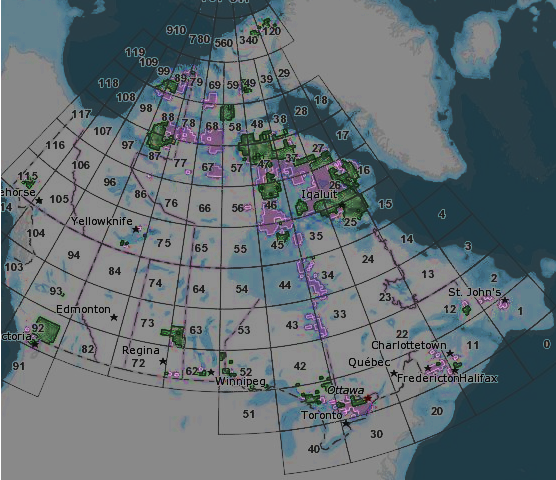
The areas shown in purple above are new; those shown in green were new in the last updates last July. The 561 new maps are those published by Natural Resources Canada in the "CanTopo" series in two batches, in September and January. Most are in the North, but there are also 39 in Eastern Ontario, 12 in New Brunswick, 4 in Nova Scotia, and 2 on Vancouver Island.
If you have maps in the indicated areas you can check for updates using the "Check" button on the Map Settings screen. Note that this feature is sometimes subject to false positives, so don't waste your time checking maps that are not in the areas shown above.
March 4th 2011
Server Downtime
Map downloads were unavailable for a few hours early today due to a server crash. My apologies for the inconvenience.
September 21st 2010
Version 1.9.1 available
This update, which may be called 1.9 or 1.9.1 depending where you look, makes a couple of small but important improvements to the app.
Firstly, the compass is now supported on the iPad, iPhone 4 and iPhone 3GS running iOS 4.x. A new button is displayed on the bottom row; when activated, the map is rotated to align with the ground.
Secondly, map mosaicing will now stretch maps as necessary if they don't align perfectly. This means that it is now possible to mosaic maps that were scanned at different scales, which is not unusual where they were not all processed at the same time. Alignment is still likely to be imperfect where maps use different map projections, but that's a rarer problem.
There are also some bug fixes, iOS 4.x compatibility improvements, and performance improvements on the iPhone 4.
September 20th 2010
User Guide PDF now available
A few users have asked for a downloadable version of the user guide that they can print out or view on their iPad when they don't have a network connection. This is now available; it's a PDF file and you can get it here. It's automatically generated from the online version, so please let me know if you notice any problems with the conversion.
July 21st 2010
Version 1.8.7 available for iPhone and iPod
This update is primarily to resolve compatibility problems with the iPhone 4's high-resolution display. A side-effect of this is that low-res maps are now "overzoomed" if you zoom in beyond their limited resolution, rather than showing the "Upgrade map" message.
It also makes some minor adjustments for iOS 4: fast app switching is now supported, and map downloads will continue in the background if you switch to another app or put the device to sleep.
July 14th 2010
New Canadian Maps
New maps are now available for some parts of Canada, as shown below:
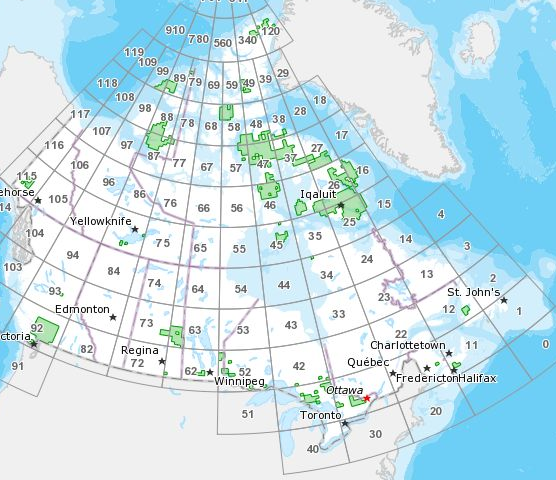
The new maps are those published by Natural Resources Canada under the brand "CanTopo". The rest of the country is covered by the "CanMatrix" series.
One potential problem with these maps is that they mosaic with adjacent sheets less well. This seems to be because the maps have been produced at a variety of different resolutions. You can see this if you zoom in on the scale at the bottom of the map. A future update to the app will make it possible to mosaic maps whose scales differ, but this change is will not be soon.
You can install these new maps using the "Check for new version" button in the Map Settings screen. Note, however, that this button is subject to false positives - please confirm that the map you're interested in is shown on the image above first.
June 25th 2010
iPhone 4 problems
If you have the new iPhone 4 you will have noticed a problem with the app when zoomed right in. Because of the new phone's higher-resolution screen, the device asks the app for an additional level of map tiles that doesn't exist when you're zoomed right in. The result is a strange effect where each map tile is replicated four times.
The work-around for the time being is just to not zoom in that far. I hope to have a proper fix soon.
If you notice any other problems with the new phone or with iOS 4.0 on older phones, please get in touch.
June 19th 2010
Version 1.8.2 Available
This update fixes the issue affecting Alaska on the map index grid, described below. It also fixes a problem with some maps that have a black stripe at their edges that interferes with adjacent maps when mosaiced, and resolves a crash when certain websites are visited for waypoint download.
June 9th 2010
Bug affecting Alaskan maps
Version 1.8.1 was supposed to only fix bugs, but it seems to have introduced a new one: most of Alaska has become inaccessible. Specifically, the 1:63,360 maps are not shown on the grid and so can no longer be selected for download, though any maps that you downloaded before upgrading will still be available.
So if you need Alaska and you've not yet upgraded to version 1.8.1, you might prefer to wait for the next version. (Information about a work-around now removed.)
June 8th 2010
Version 1.8.1 Available
This update for both the iPad and iPhone versions of the app is a bug-fix release. It should resolve a number of issues including crashes when selecting uninstalled maps from search results, when viewing the waypoint files screen, and when downloading waypoint files from the web. It also now understands waypoint files whose names have extensions in upper case.
April 24th 2010
Topo Maps for iPad
A separate version of the app, "Topo Maps for iPad", is now available for iPad owners. This has essentially the same functionality as the iPhone/iPod version but makes use of all the extra screen area to show more of the map. The iPad does make a really excellent map viewer - I hope you like it.
One bug has been reported already, however; it seems that selecting an uninstalled map from the search results screen will make it crash. The workaround is to instead select a nearby feature from the search results. For example, if you search for "Grand Canyon AZ", don't choose the row with the map symbol but instead choose the row with the "populated place" symbol. Then, touch the map square to select and install. I'll fix this in an update soon; please let me know if you find any other misfeatures that I should resolve at the same time.
March 30th 2010
Version 1.7 Finally Available
Thanks for your patience - it has been a while since the last update. This version finally adds waypoints, expands the search database to more than a million features, and updates the operation and display of the GPS.
I hope you enjoy the many new features in this version. Do review the user guide to make sure you don't miss anything. Feedback about the new features would be much appreciated - it's likely that things will be refined in future updates.
January 23rd 2010
Server Problems
The server that controls map downloads and also operates this website failed early today. It was down for about 10 hours, but now seems to be functioning normally. The cause of the problem has not yet been identified.
Apologies to everyone who was unable to download maps during this period.
December 2nd
Dual GPS Cradle for iPod Touch
If you have an iPod touch, you may be interested in the new GPS Cradle from Dual. Your iPod simply plugs into the cradle and GPS location information is then available to your apps, including Topo Maps. Dual have tested the cradle with Topo Maps and report that it works correctly; the only issue you may encounter is that the app doesn't wait long enough for a location to be reported. In this case, just touch the button again and it will continue waiting.
October 19th
New maps for Virginia
I've installed about a hundred new versions of maps in the NW Virginia / E West Virginia area. Specifically they're in the rectangle between 38-39 degrees N and 78-80 degrees W. To get the new versions, just delete any maps that you currently have in that area and re-download them.
Do please let me know if you find other areas where newer versions of the maps are available.
October 9th
Version 1.6 adds multiple map downloads and "quick install" mode
This version adds a number of features that you're sure to find useful if you want to view large numbers of maps. You can now select multiple maps to install in one go (just touch one corner map until it's selected, and slide your finger to select more). Also, you can now choose the "Quick Install" mode: this downloads a lower-resolution version of the map that's typically about ten times smaller than the full version. You can later upgrade these maps to full resolution using a button in the map settings popup.
Multiple downloads are currently limited to ten maps at full resolution or 100 maps at low resolution. This is a per-use limit - there is no limit on the total number of maps that you can install, apart from the capacity of your device.
The app should now start significantly more quickly if you have large numbers of maps installed. This should also fix the problems identified with version 1.5, described below; please get in touch if you have any problems.
Finally, an additional co-ordinate format, degrees and decimal minutes (i.e. dd mm.mmm) has been added.
September 19th
Problems when hundreds of maps are installed
The more maps you have installed, the longer the app takes to start. Most users will not notice this, but if you have hundreds of maps installed it can get annoyingly slow. Version 1.6 will improve this.
This turns from an annoyance to a bug when the startup time exceeds about 20 seconds, because the device decides that the app has failed to start and kills it. For this reason, if the app takes more than about 15 seconds to start I suggest that you do not install more maps without also deleting some.
It is possible that version 1.5 is worse in this respect than version 1.4 was. For that reason, if you currently have version 1.4 and are considering upgrading to version 1.5 you should consider deleting some maps before upgrading. More info here.
September 17th
Problems when upgrading to version 1.5?
If you were one of the first users of Topo Maps back in March, you may be affected by a problem that has been identified when upgrading to version 1.5. If you first purchased Topo Maps version 1.1 or later, from April onwards, you will not be affected. More info here.
September 14th
Version 1.5 adds Canada, Alaska and Map Mosaics
The most obvious change in version 1.5 is the new app icon. Apart from that, there are two important new features. Firstly, the area covered has been extended to include Alaska and Canada. These maps are accessed via an additional satellite index map to the North of the existing one. In Alaska the maps are a mixture of 1:24,000 (mainly in the South and Anchorage area) and 1:63,360 (other areas). In Canada, the app uses Natural Resources Canada's 1:50,000 maps. These seem to cover almost the whole country, though many areas in the North are monochrome.
The second feature is the ability to mosaic together adjacent maps. This is intended to make it easier to navigate in areas at the joins between maps, but it's also useful if you want to get a zoomed-out view of a large area. To use this feature, select the first map from the satellite map as usual and then use the arrow buttons at the edges of the map to add adjacent maps to the mosaic.
The mosaic feature only works where the maps have the same map projection and have been scanned at the same scale, so it may fail to work at e.g. state boundaries. We may be able to improve on this in the future.
If you're considering upgrading to version 1.5 there are a couple of other things to consider:
- This version requires iPhone OS version 3.0 (or newer). If you're still using version 2.x, this update will not work.
- If you bought the app when it first came out, note the maps installed using version 1.0 will be erased during this upgrade. All maps installed using later versions will continue to work.
July 21st
Version 1.4 adds hill shading and fills the remaining gaps
The most obvious change in this version is the addition of hill shading. When you install a map it now also downloads corresponding altitude data, and from this it computes a shading overlay based on the simulated sunlight direction that you specify. This makes these already high-quality maps look even better, especially when you're looking at a zoomed-out map where the contour lines are hard to see. Of course you can turn off hill shading if you want.
This height data is also used to display an estimated height at the center of the screen. We hope this is useful, but note that the accuracy of this data is relatively poor.
The map database has seen some major fixes in this version and we're now confident that there are only a handful of maps (out of about 54,000) that are missing from the server.
We've also made some improvements to the user interface. In particular the co-ordinate display is now enabled and disabled by means of a button at the top right of the screen. The co-ordinate display is now also available on the satellite map screen, which will be useful if you need to find the map for a particular latitude-longitude position.
Finally, we've made some changes to the way that downloads work. Specifically, if the app detects that a download has stalled for more than 30 seconds it will now make an attempt to poke it back into life. A few users have reported problems with downloads that are probably explained by problems with their network providers; with luck, this trick might help in those cases.
As ever, do let us know what you think of the new version and what you would like to see in the next release.
July 6th
Version 1.3.1 available
This is a bug fix release; it corrects an error in the grid letters in an MGRS grid reference. It also corrects a few issues in the map database.
May 26th
Version 1.3 available
This latest version adds:
- The satellite map now shows about 8,000 national and state parks, forests, wildlife areas and so on. These are also shown in the search results, hopefully making it easier to find the map that you need. These locations have been extracted from the 2 million placenames in the Geonames database; your feedback about further landmarks that we could add in the future - or which we should leave out - would be appreciated.
- The NAD27 map datum is now available in addition to WGS84. This will be useful if you need to line up co-ordinates with map grids, since the map grids normally use NAD27. Note that NAD27 is likely to be inaccurate outside the continental U.S., especially in HI.
- Maps of the U.S. Virgin Islands are now included.
- The "Go to Panoramascope" function has been re-introduced, but with an additional warning message to avoid any confusion in the case when the Panoramascope app is not installed.
May 19th
Version 1.2.2 available
Version 1.2.2 is now available in the App Store; this is a bug-fix release. Previously, some maps suffered from a "stretched pixels" effect at maximum zoom; this should now have been fixed.
May 12th
Website update for mobiles
I've just made some changes to this website that should be invisible to normal web browsers, but which will cause it to display better if you're using Safari on an iPhone or some other mobile browser. All the same words and images are included but, for example, the multi-column layouts are reduced to a single column. My plan is that some future version of the app may link to this site from a "help" function, so it needs to look OK. Let me know if you see any problems.
April 27th
Version 1.2 available
The latest version is now available in the App Store with the following new features:
- A new measurement mode displays co-ordinates in decimal degrees, degrees minutes and seconds, UTM and MGRS/USNG. It also shows a scale in miles, feet or kilometers.
- A distance-bearing mode lets you measure between a pair of points, with the bearing shown relative to either true N or magnetic N. Magnetic deviation is computed automatically.
- New buttons make it quicker to navigate between adjacent installed maps.
- Puerto Rico is now included.
- The resolution of the satellite map has been further increased.
- The index grids for HI and MA have been tidied up.
- A few minor bugs have been fixed, hopefully making the app operate more smoothly; in particular the flashing issue seen with some maps at some zoom levels is improved.
Please note, however, that inter-operation with the Panoramascope app has been removed. If you found this feature of older versions useful you may prefer to not upgrade. I have removed this feature at Apple's request: they believe that a user who did not have the Panoramascope app installed would be confused by the message that the operating system displays when Topo Maps tries and fails to start the Panoramascope.
April 14th
Map coverage update (FL, ND and NE)
A user emailed me recently to complain that the maps that he needed in Florida didn't seem to be available. On investigation it turned out that most maps for Florida, North Dakota and Nebraska were not downloading due to a problem on the server. This is now fixed. My apologies for the inconvenience that this must have caused. I've also put together some statistics about the coverage in each state that you can now see on the questions and answers page. Do let me know if you find that any of the missing areas cover important hiking areas, or if you have any other problems or questions.
April 1st
Massachusetts maps available
Maps of Massachusetts are now available. This state was previously missing for the map archive. However, there is a complication - which may perhaps explain why the maps were previously missing. Much of MA is covered by double-width sheets, i.e. each download covers two of the yellow map squares shown by the app. For each pair, if you touch the right square the whole double-width map will be installed; if you touch the left square you'll get a "download failed" message. For extra confusion, the name shown on the map is often the name of the left square shown on the app. I will try to tidy this up in a future version of the app. Do let me know if you find any problems with these new maps.
April 1st
Version 1.1 available
Version 1.1 has finally made it to the App Store! I do hope that you like the new features; I'm already working on version 1.2 which adds even more.
March 25th 2009
New web site
Version 1.1 of Topo Maps and a new demo version are currently in review at Apple. I can't say how long that will take, but somewhere between a week and a month is likely. While I wait for them to cast their judgment I'm putting together this new website describing all the features in the new version. If you're currently using version 1.0 I think you'll like the new higher-resolution satellite map and the ability to search for maps by name. I'm now deciding what features to add to version 1.2 - if you have any requests, do please get in touch.